


Preparing for the PTE exam today looks very different from what it did a few years ago. Earlier, students depended heavily on coaching centers, printed books, and classroom schedules. Now, most serious. Whether you are just starting your PTE preparation or already practicing online, this guide will help you understand what PTE apps can and cannot do, and how to use them smartly.
1. What is a PTE app?
A PTE app is a mobile or desktop application that students use while preparing for the Pearson Test of English (PTE Academic). Most students don’t use these apps in one long sitting. Instead, they open them briefly, practise a little, and come back later.
A typical PTE app usually includes:
- Practice questions that follow the PTE exam style.
- AI-based scoring or feedback for practice tasks.
- Progress tracking so students can see improvement over time.
- Vocabulary and pronunciation practice.
What students often misunderstand is this: a PTE app is not a single solution for everything. Some apps exist only to explain concepts. Others are meant for daily practice. Only a few platforms are designed to handle full-length mock tests properly. However, practicing on the PTE app is not beneficial, as in reality, you will take the exams on desktops.
2. Is there an official PTE app by Pearson?
No, there is no official application for PTE app by Pearson. So you can use Gurully’s PTE application. Here you will find:
- Sample questions for different task types.
- Explanation of how the exam is structured.
- A basic overview of scoring.
- Expert-crafted templates.
- Instant-Ai scoring.
- Prediction file.
Gurully’s PTE application helps you understand what the exam looks like. For better practice, it is advisable to switch to a desktop.

Start your free PTE mock test with Gurully and get AI-powered analysis for a personalized journey.

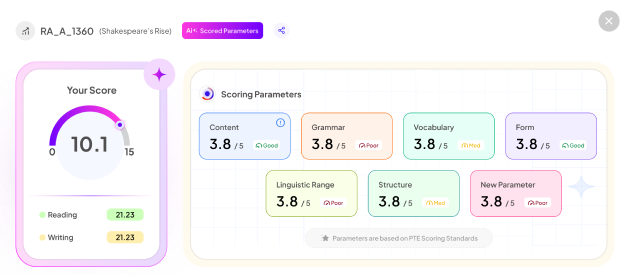
- Kickstart your PTE prep with a free AI-scored mock test
- Boost your score with in-depth analysis & smart recommendations
3. Are third-party PTE apps allowed and safe to use?
Yes. Practicing with other practice apps is safe, and you can achieve your target score, too. In fact, most serious PTE candidates usually depend on Gurully’s PTE app to understand the exam. Know why students trust Gurully’s PTE practice application:
- Follows actual PTE exam patterns.
- Gives accurate scoring just like Pearson’s algorithm.
- Gives in-depth feedback which helps in understanding what went wrong.
- Includes prediction questions and community answers.
4. What is Gurully, and how does its PTE app work?
Gurully is an online PTE practice platform for students who want a structured practice without shortcuts. The Gurully app is mainly used for:
- Daily PTE practice.
- Skill-wise improvement over time.
- Understanding individual question types.
- Practising speaking, listening, reading, and writing tasks.
- Tracking progress gradually.
Mock tests on Gurully are available on the web platform. This is because full-length PTE mock tests require:
- Stable microphone performance.
- Accurate speaking analysis.
- Comfortable screen interaction.
- Long, uninterrupted practice time.
- Mobile phones are simply not built for this type of testing.
5. Why don’t most PTE apps offer mock tests on mobile?
This is one of the most confusing areas for PTE students. From a technical perspective:
- Speaking tasks need clean audio.
- AI scoring depends on stable recordings.
- Mobile phones pick up background noise easily.
- Long tests often get interrupted.
There is also the practical exam reality:
- The real PTE exam is taken on a computer.
- It happens in a test center.
- It is never taken on a phone.
Because of this, serious platforms prefer mobile apps for daily and regular practice and desktop platforms for mock tests. As for real exam simulation this setup is more helpful.
6. Can I prepare for PTE completely using only an app?
No. Apps are useful for:
- Daily practice.
- Understanding question formats.
- Building routine.
But full preparation also requires:
- Desktop mock tests.
- Exam-style simulation.
- Proper speaking setup.
- Full timing practice.
Students who score well usually mix both. App practice first. Desktop evaluation later.
7. Which PTE app is best for beginners?
If you are starting your preparation, then Gurully is the best PTE practice application. The application provides:
- Real exam format.
- Prediction questions.
- Free practice questions.
- Accurate and instant AI-scoring.
- Templates.
- In-depth feedback on practice questions.
If you are willing to do ongoing practice, then the application is best. From your phone you can easily practice unlimited questions and can strengthen your individual sections.

8. Do PTE apps give real exam questions?
PTE applications have predicated questions that help in understanding what sort of questions may appear in real exams. Besides that, these apps help through:
- Practice questions exactly like how it will come in the real exam.
- Accurate scoring of the responses.
- Different levels of difficulty so that you can do preparation in a better way.
9. How accurate is AI scoring in PTE apps?
AI scoring accuracy depends on several things:
- The algorithm being used.
- Speech recognition quality.
- Question structure.
- Practice environment.
AI scores should be treated as:
- Practice references.
- Progress indicators.
They are not guaranteed exam results. Even Pearson states that practice scores may differ from real exam scores.
10. Do PTE apps help with pronunciation?
Yes, pronunciation plays a vital role in scoring so the application helps in improving it through various speaking tasks. Gurully’s PTE application helps students in:
- Understanding unclear pronunciation.
- Fluency improvements.
- Maintain a steady speaking pace.
Gurully’s system focuses strongly on pronunciation clarity, which aligns with Pearson’s scoring approach.
11. Are free PTE apps enough to score 79+?
Free apps can help students:
- Understand basics.
- Practise occasionally.
- Become familiar with question types.
However, scoring 79+ consistently usually requires:
- Structured practice.
- Progress tracking.
- Exam-level difficulty.
- Desktop mock tests.
12. What should I download first as a PTE student?
Recommended order:
- Official PTE Guide (for exam understanding).
- A reliable practice app like Gurully (for daily practice).
- Desktop access to a mock test platform (later stage).
- Avoid downloading too many apps at once. Consistency matters more than variety.
13. Does Gurully’s app sync with the web platform?
Yes. Your practice data is connected to your Gurully account, allowing you to:
- Practice on mobile.
- Analyze performance on the desktop.
- Switch devices easily.
- However, remember:
- Mock tests must be taken on a desktop
14. Is it okay to practice speaking on a phone?
Yes, for practice and improvement. But for final readiness:
- Desktop microphone.
- Quiet environment.
- Exam-like posture.
This ensures your speaking habits match the real test setup.
15. How many hours should I use a PTE app daily?
There is no fixed number, but most successful students:
- Use apps for 30–60 minutes daily.
- Focus on weak sections.
- Avoid over-practice without analysis.
- Quality practice beats long sessions.
16. Do PTE apps help with time management?
Yes, especially when:
- Practicing individual tasks.
- Understanding response length.
- Learning pacing strategies.
Mock tests (on desktop) are essential for full-time management skills.
17. Can PTE apps replace coaching institutes?
For many students, yes. Especially if:
- The app follows real exam logic.
- You practice consistently.
- You understand your mistakes.
However, self-discipline is crucial.
18. What mistakes do students make while using PTE apps?
Common mistakes include:
- Relying only on mobile apps.
- Ignoring desktop mock tests.
- Practicing without reviewing feedback.
- Chasing scores instead of improvement.
- Using unreliable “prediction” apps.
Awareness prevents wasted effort.
19. Are PTE apps updated according to exam changes?
Gurully’s platforms regularly update:
- Question formats.
- Scoring patterns.
- Difficulty levels.
Before choosing an app, check whether it responds to recent PTE updates.
20. How should I use PTE apps smartly?
Think of PTE apps as tools, not shortcuts. Use them to:
- Build daily habits.
- Strengthen weak skills.
- Gain confidence.
But always combine:
- Mobile practice.
- Desktop mock tests.
- Realistic expectations.
This balanced approach gives the best results.
21. Do PTE apps really understand my accent?
This is one of the biggest misunderstandings among PTE aspirants.
PTE apps do not judge your accent. They don’t classify speech as Indian, British, or Australian. Instead, they analyse how clearly sounds are produced. Pearson’s scoring system focuses on pronunciation clarity, stress, and fluency — not accent origin.
If an app flags pronunciation issues, it usually means:
- Certain consonants or vowels are unclear.
- Word stress is inconsistent.
- Speech rhythm is uneven or rushed.
- Accent is not the problem. Clarity is. This is why consistent practice on apps helps, even if your accent remains unchanged.
22. Why do my speaking scores keep changing in PTE apps?
Score fluctuation is normal and happens for almost every student.
Unlike reading or writing, speaking performance depends on several real-time factors. Small changes in your environment or delivery can affect how your response is processed.
Common reasons include:
- Background noise or mic sensitivity.
- Speaking too fast or too softly.
- Hesitation or uneven pauses.
- Different difficulty levels of questions.
Instead of chasing a single score, focus on score patterns over time. If your average performance is improving, you’re moving in the right direction.
23. Can any PTE app predict my real exam score?
No. And this is important to understand clearly.
PTE apps can estimate performance, but they cannot predict your final exam score with certainty. Even Pearson states that practice scores may vary from real exam results.
Why?
- The real test is taken in a controlled test-center environment.
- Scoring uses multiple checks and validations.
- Speaking conditions differ from home practice.
24. Are mobile PTE apps enough for full preparation?
Mobile apps are excellent for daily practice, but they are not designed for complete exam simulation.
Apps work best when used for:
- Practising individual question types.
- Improving pronunciation and fluency.
- Building daily study consistency.
- Strengthening weak skills.
However, full preparation also requires:
- Desktop-based mock tests.
- Longer, uninterrupted test sessions.
- Exam-like microphone setup.
This is why platforms like Gurully provide practice on mobile, while mock tests are available only on desktop. It reflects the real PTE exam environment more accurately.
25. Are free PTE apps reliable?
Free apps can be helpful, but only up to a point. They are good for:
- Understanding question formats.
- Light daily practice.
- Vocabulary exposure.
But most free apps lack:
- Exam-level difficulty.
- Detailed feedback.
- Structured progress tracking.
- Updated scoring logic.
For higher target scores, students usually need a more structured platform.
26. Do PTE apps help with vocabulary and grammar?
Yes — when used correctly. Good PTE apps expose students to:
- Academic vocabulary in context.
- Common sentence structures.
- Frequently repeated word patterns.
However, memorising word lists without understanding usage rarely helps. Vocabulary improves fastest when you see, hear, and use words repeatedly in exam-style questions.
27. Why does my listening improve more slowly than other skills?
Listening is often the slowest skill to improve, and that’s completely normal. Listening depends on:
- Accent exposure.
- Focus and attention span.
- Memory retention.
- Familiarity with academic speech.
Unlike speaking or reading, listening improvement happens gradually. Consistent exposure matters more than intensity.
28. Should I use templates from PTE apps?
Templates can help — but only when used wisely.
They are useful for:
- Avoiding blank responses.
- Maintaining structure.
- Saving thinking time.
But over-memorised or outdated templates can:
- Sounds unnatural.
- Reduce content relevance.
- Affect fluency and coherence.
The best approach is to adapt templates, not recite them mechanically.
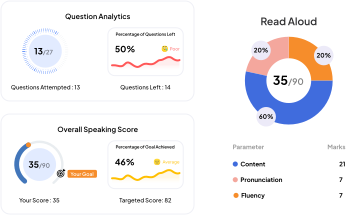
Get instant AI-powered analysis to track strengths, weaknesses & improve
- Personalized AI Insights – Understand your strengths & weaknesses instantly
- Smart Progress Tracking – Monitor improvement with in-depth analysis
- Boost Your Score Faster – Focus only where it matters most
29. Can PTE apps really replace coaching centres?
For many students, yes. Modern PTE apps offer:
- Flexible practice schedules.
- Skill-wise feedback.
- Exam-pattern questions.
- Cost-effective preparation.
However, success depends on:
- Consistent practice.
- Honest self-analysis.
- Using the app correctly.
An app is a tool. Discipline still matters.
30. What is the smartest way to use PTE apps?
Students who score well usually follow a balanced approach:
- Use mobile apps for daily practice.
- Focus on weak areas first.
- Review feedback regularly.
- Take desktop mock tests periodically.
This combination builds skill, confidence, and exam readiness without confusion.
Also Read:
- Everything You Need To Know About PTE Score & Result
- Everything You Need To Know About PTE Exam Guide
- PTE Essentials Explained: Every Aspirant Should Know About